

Migrating Groups and Projects to git.nrw
On this page
You can migrate your groups, including members and projects, from your GitLab instance to git.nrw. In short:
- Be aware there are quota limits active in git.nrw.
- Make sure every group member has at least once logged in to git.nrw before migrating.
- Make sure every group member has set their mail-address to public (can be temporarily) in the source GitLab before migrating and uses the same primary mail-address in both systems*.
- Create a private access token in the source GitLab
- Create a group in git.nrw and use the “Import group” function to connect your source GitLab instance.
- Migrate the desired groups.
*Otherwise “placeholder” users will be created during migration which you need to match manually afterwards.
For a more detailed manual see below.
Step 1: Prerequisites
This guide describes a way to migrate your GitLab groups and projects to git.nrw via the direct transfer feature. Direct transfer can migrate your group members and repository data directly to git.nrw. Have a look to learn what is getting migrated and about the estimated migration duration . Be aware that your GitLab administrator may need to adjust some GitLab settings to make migration possible: Pre-Transfer requirements for GitLab administrators .
Pre-Transfer Requirements (group owners)
- User Account Setup (User)
- All group members must at least once sign in to git.nrw before transfer.
- E-mails must match and be confirmed & public in the source GitLab.
- Verify user profile at: GitLab Profile Settings
.
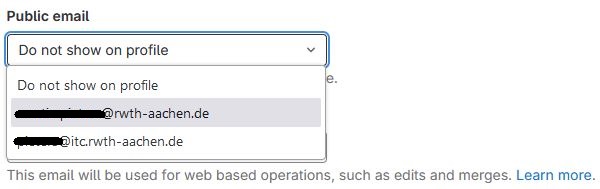
Group members will not be migrated if they have not logged in to git.nrw before migration and have set a public e-mail on the source GitLab instance. The commit history can also only link entries to the git.nrw user account if all mail-addresses of the source GitLab user account are added to the git.nrw user. But; if you add missing mail-addresses later, git.nrw is still able to match commits to the user account after migration is already done.
Step 2: Transfer Process
1. Setup Access Token
- Create an access token for your user in your GitLab instance (not git.nrw).
- The token needs at least api and read_repository scopes
2. Initiate Transfer
- Create a new group on gitlab.git.nrw: https://gitlab.git.nrw/groups/new
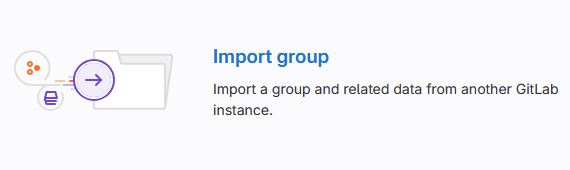
- Select Import group:
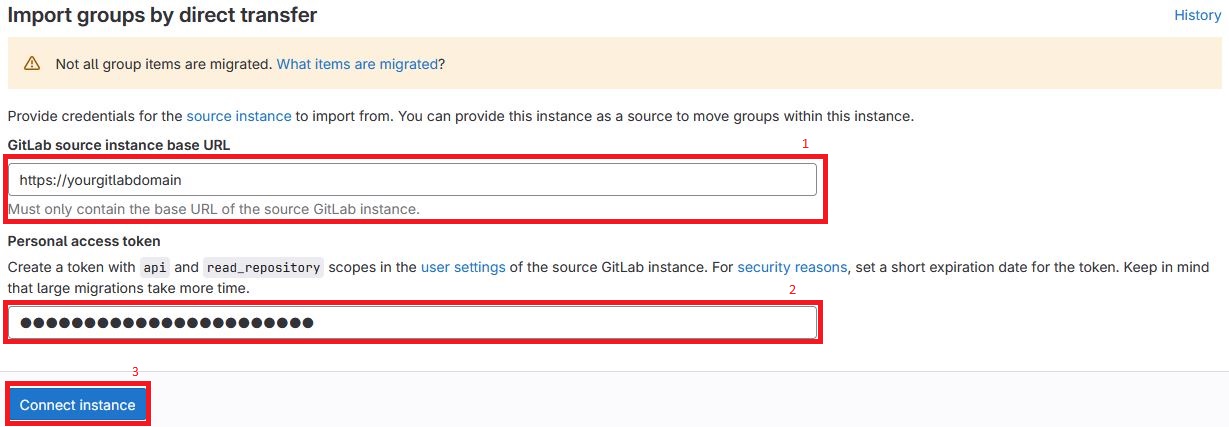
- Enter your GitLab URL (1) and your access token (2) and hit connect instance (3):
- Choose Source group to import (1), a parent group on git.nrw (2) and a groupname (3) and hit Import with projects (4) (alternatively you can “import without projects”):

- Next you can follow the progress of migration. This can take some amount of time, depending on how many projects are getting migrated. You will be informed by e-mail when the migration is done. Members also get an e-mail informing them about access to the new group on gitlab.git.nrw.
- For more information follow the official GitLab transfer guide: