Migrating Personal Projects to git.nrw
On this page
Step 1: Prerequisites
This short guide describes the recommended way to import your GitLab private (or a single group-) project to git.nrw via Repository URL import. Be aware that there are more ways possible to import projects into git.nrw: GitLab Import . You can’t import GitLab issues and merge requests this way. For this case we recommend to move your projects into a group and use Direct transfer . Be aware your GitLab administrators may need to adjust GitLab settings on the source GitLab: Pre-Transfer requirements for GitLab administrators
Pre-Transfer Requirements (Users)
- User Account Setup (User)
- You need to be able to login to git.nrw in order to migrate projects
Step 2: Import Process
1. Setup Access Token
- Create an access token in your project on your GitLab instance (not git.nrw).
- The token needs at least api and read_repository scopes
- To set them up open your Project and go to Settings -> Access tokens
2. Initiate Import
- Create a new project and choose Import project:
- Choose Repository by URL:

Give your:
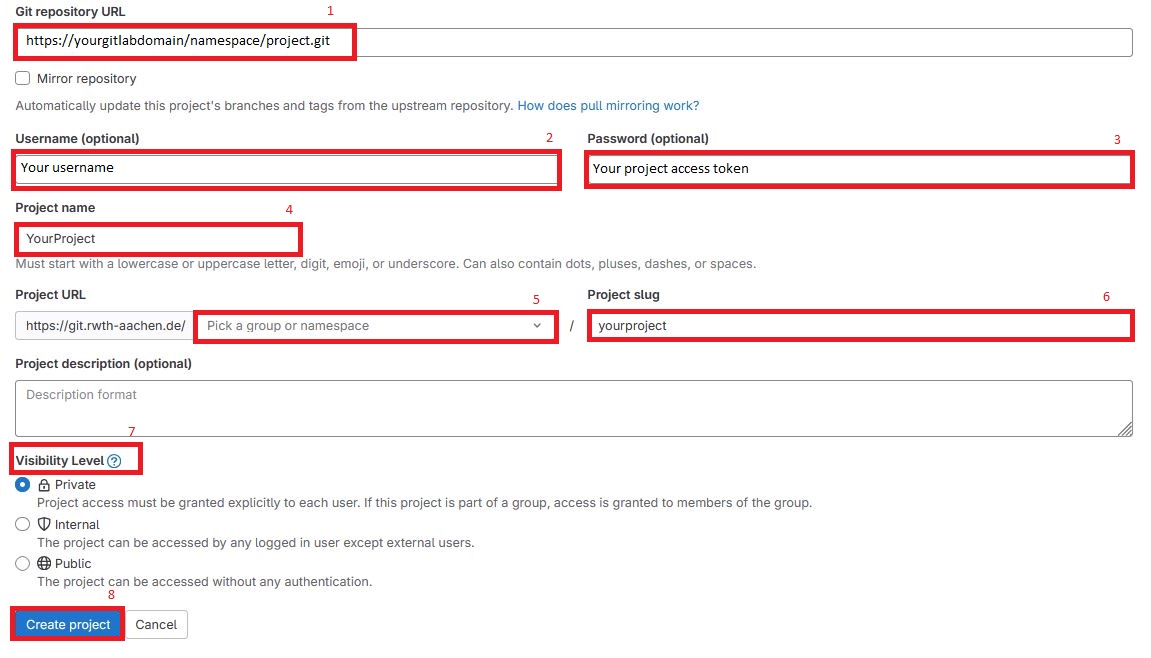
- Git repository URL [1] — This is the same URL you would use for an HTTPS cloning process
- Source GitLab username [2]
- Project access token as Password [3]
- Project name [4] — Must not match the original project name from your source GitLab
- Group or namespace [5] — You can either move the project into your personal git.nrw namespace or pick a group if you want to share it
- Project slug [6] — As the identifier in the URL (automatically set to your project name)
- Visibility level [7] — Can differ from the source GitLab
- Then hit Create project [8] to start importing: