

Groupmanagement
On this page
Structuring and Management of Universities in git.nrw
In GitLab, projects and their associated access rights are primarily organized via groups, which allow several related projects to be managed simultaneously and members’ permissions to be controlled centrally. A single person can create a maximum of 10 personal projects without assigning them to a group, making group‑based work essential for efficient resource management. The responsibility for managing a university’s (top‑level) groups lies with the university itself.
Group Hierarchy in GitLab
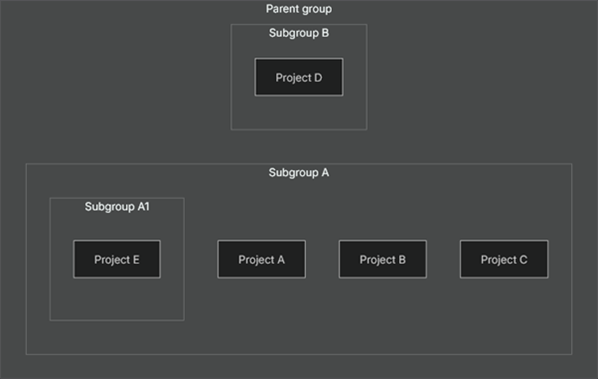
GitLab groups are arranged in a tree structure:
- Top‑Level Group – created directly at the organization’s “root”.
- Parent Group – contains further sub‑groups.
- Subgroup – a group that is part of another group.
Advantages of Groups in GitLab
- Clarity – Working in groups creates a clear overview of the entire organizational structure and the projects arranged within it.
- Optimized access control – Members can be added to a group quickly; the permissions are automatically propagated to all sub‑groups and projects.
- Secure knowledge base – Access to projects is retained even if individual responsible persons leave the university; new users can continue working seamlessly.
- Project‑management tools – Within groups, both epics and issue boards can be created, providing an overview of topics, subtasks, and progress for larger initiatives.
- Centralized resource management – With group runners, an assigned runner is available to all projects and sub‑groups of the group, reducing administrative effort, creating a uniform build environment, and enhancing security.
Group Hierarchy in git.nrw
Well-known Group Arrangement
For a university, for example, there are two well-known ways of organising groups.The first option is to set up a central top-level Group for the entire university. This offers the advantage of a direct overall overview as well as access to various advanced features, such as a comprehensive Security Dashboard, a Vulnerability Report, a Compliance Center, and Value Stream Analytics. However, a significant disadvantage of this approach is that administrators of the Parent Group automatically gain access to all subgroups. For many potential users, this may be undesirable for data protection or autonomy reasons.
The second possibility is to dispense with a superior Top-Level Group for the entire university. In this approach, unlike the subgroup model, the groups are created as direct Top-Level Groups. While this results in the loss of some central analysis and reporting functions, the respective owners of a Top-Level Group can independently determine who receives access and who does not. If this approach is chosen, it is recommended to use a uniform naming convention. The following scheme has proven effective:
“[University]-[Group Name]”.
A further range of options is also available and can be viewed on the official GitLab website .
Applying for (top-level) groups
The creation of top-level groups is managed centrally. For that, the universities require designated contact persons who are granted a functional account and are thus authorized on behalf of the university to create groups at the top-level. Each university can select the hierarchy that best suits its needs from the group organization options outlined above. If desired, an appointment can be arranged via the contact form or through the established communication channels of git.nrw to view examples of how other institutions handle this. This can help in planning the next steps.
If end users at a university wish to create additional (top-level) groups, they must first submit a request for new (top-level) groups via the contact form to their university. These then can be created and approved by the group managers. If necessary, the functional account can be removed from the groups.
Further information on the terms of use can be found on our git.nrw website. GitLab also offers an API connection, which enables further scenarios for group creation by a participating university.
Cross-institutional Projects
There are projects that are developed jointly by several universities. For these, a new Top-Level Group without naming restrictions is usually created.