Logo
Home News
All Courses
Profile
FAQ
Documentation
Contact
Deutsche Flagge

Find courses, guides, and answers quickly.

↵ select ↑ ↓ navigate esc close
gitlab.git.nrw
Logo
Logo

Find courses, guides, and answers quickly.

↵ select ↑ ↓ navigate esc close
Home
News
Learn
All Courses
Profile
Support
FAQ
Documentation
Contact
Deutsche Flagge
gitlab.git.nrw
Intro

CI/CD Fundamentals
Introduction to CI/CD Pipelines
Benefits of Using GitLab CI/CD
GitLab CI/CD Components
Practical Implementation of CI/CD Pipelines
.gitlab-ci.yml Basics
How to Create a .gitlab-ci.yml File
Basic Structure of a .gitlab-ci.yml File
Step by Step Guide to Creating a .gitlab-ci.yml File
Advanced Configuration
Full Example
GitLab Runners
GitLab Runners
Choosing the Right Runners
Runner Configuration
Runner Management Best Practices
Why Use Runners?
GitLab Executors
What Are GitLab Executors?
Why Are Executors Important?
Docker Executor
Shell Executor
Specific Runners
Installing Specific Runners
Installing GitLab Runner on Linux
Installing GitLab Runner on macOS
Installing GitLab Runner on Windows
Creating the Runner
Registering the Runner
Verifying the Runner
Configuring the Runner
Artifacts
Artifacts in GitLab CI/CD
Storing Artifacts in .gitlab-ci.yml
Retrieving Artifacts
Using Artifacts in Subsequent Jobs
Advanced Artifact Management
Conclusions
Documentation Generation
Documentation Generation in GitLab CI/CD Pipelines
Setting Up MkDocs
Configuring MkDocs
Creating Documentation Pages
Summary
Monitoring
Basic Monitoring in GitLab CI/CD
Enable Pipeline Monitoring
Add Notifications for Pipeline Events

Specific Runners

Verifying the Runner

< >

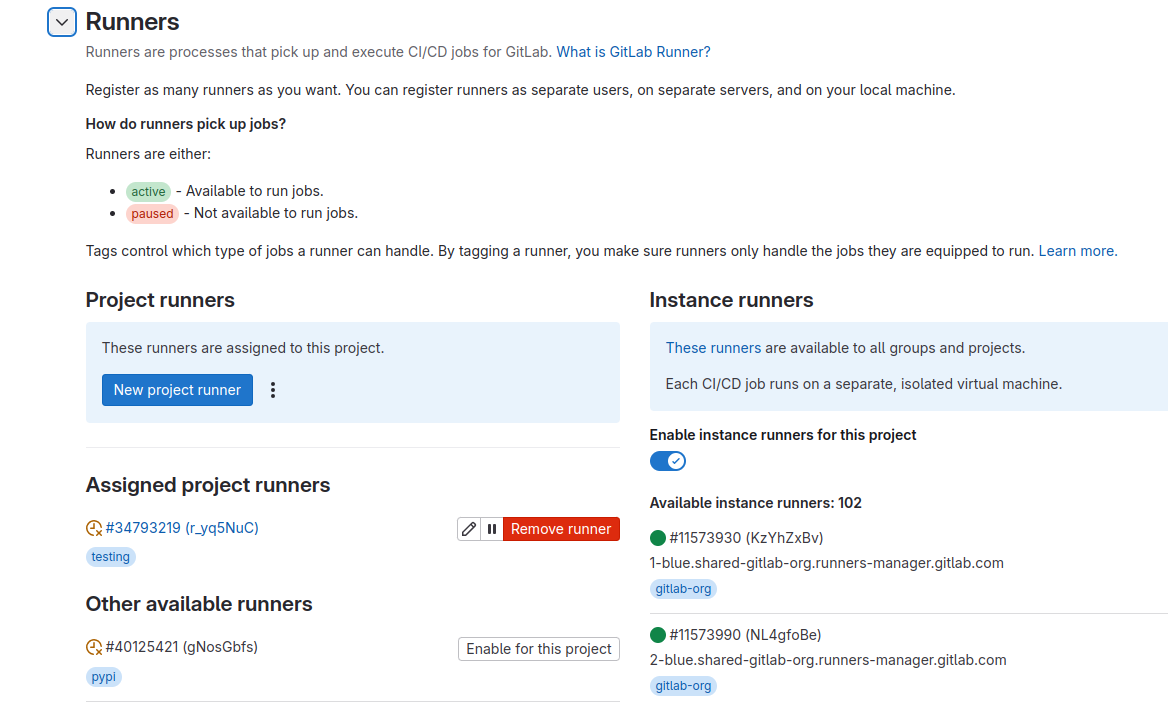
5.7.. Verify the Runner

Go to your GitLab project and navigate to Settings > CI/CD > Runners. You should see your newly registered runner listed under “Specific Runners”.

Verify the Runner

This page would like to save your progress on your device so you can continue where you left off.

Home

  • About
  • Governance
  • News
  • Use Cases
  • Contribute
  • Tags

Learning

  • Profiling Quiz
  • Courses
    • Beginner
    • Intermediate
    • Expert
  • Roles

Community & Support

  • Documentation
  • Contact
  • FAQ
  • Community
  • Mailing List

Legal

  • Imprint
  • Terms
  • Privacy

git.nrw, created by contributors

is licensed under CC BY 4.0 CC BY 4.0 CC BY 4.0

Logo
supported by DIGITALE HOCHSCHULE NRW
funded by Ministerium für Kultur und Wissenschaft des Landes Nordrhein-Westfalen

Privacy & Features

Choose which features you want to use. You can change your settings at any time.

Learning Progress

Save Learning Progress

Automatically saves your position in courses and videos so you can continue seamlessly.

External Content

YouTube Videos

Enables displaying YouTube videos. Data will be transmitted to Google.

Vimeo Videos

Enables displaying Vimeo videos. Data will be transmitted to Vimeo.

TIB AV-Portal Videos

Enables displaying videos from the TIB AV-Portal.

Privacy Settings
Loading...
Click to configure
0
Hidden Messages
0 message(s)

No hidden messages

Click to restore